 EN
EN

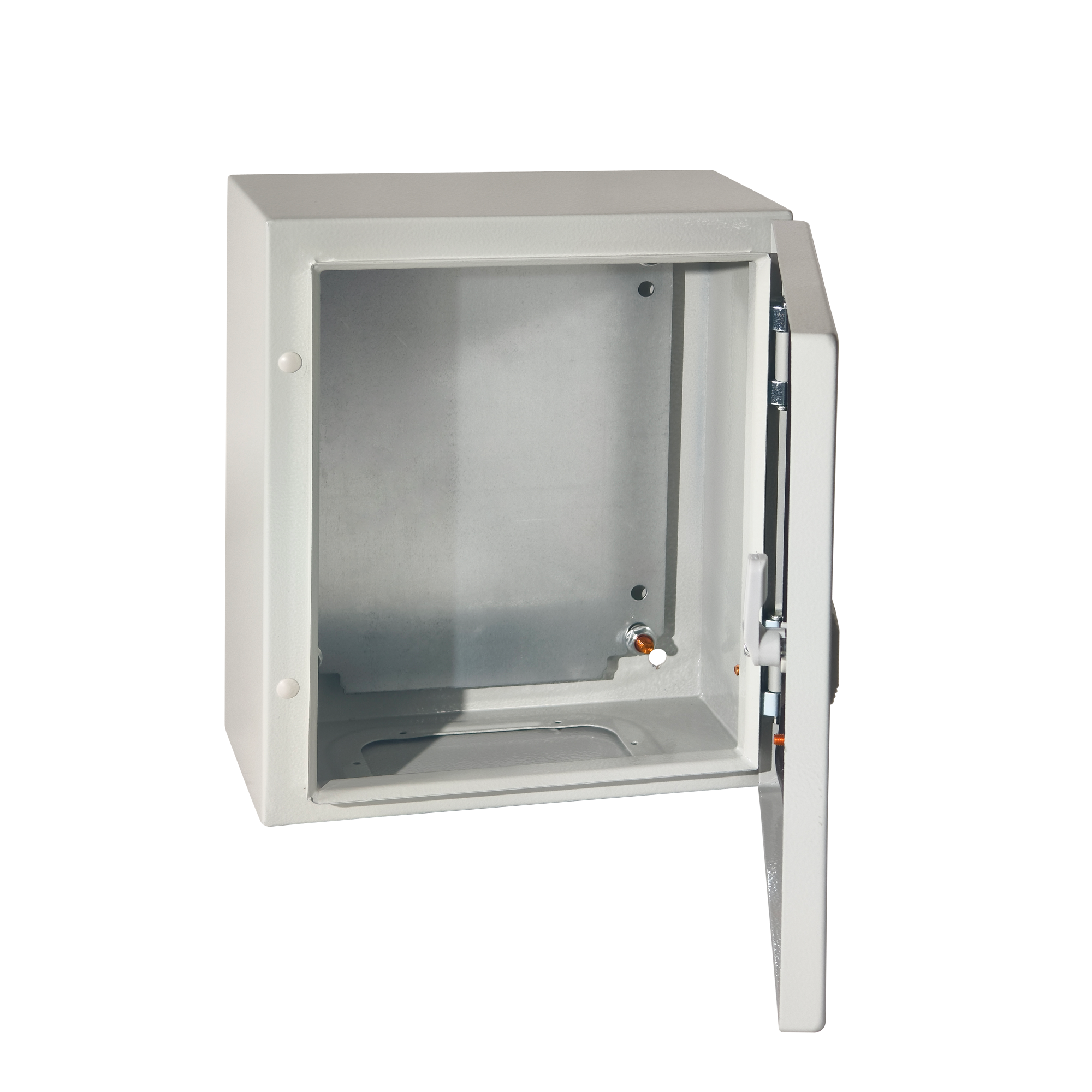
Mounting equipment correctly inside a data-center rack is one of those decisions that looks straightforward on paper but carries significant structural consequences in practice. Every steel enclosure installed in a server room or edge-computing node must be evaluated not only for its electrical protection rating but also for its static load capacity — the maximum weight it can safely support without permanent deformation or failure. Getting this right protects hardware investments, ensures uptime compliance, and satisfies the safety obligations that data-center operators carry toward their clients and insurers.
This guide is written specifically for data-center engineers, facilities managers, and procurement specialists who need practical, engineering-grounded guidance on how static load ratings interact with steel enclosure selection and rack-mounting methodology. We will examine how load ratings are defined, how they translate to real mounting configurations, and what installation practices keep a steel enclosure performing safely over years of continuous operation. Whether you are designing a new server room or retrofitting an existing one, the principles here will help you make confident, defensible decisions.
Understanding Static Load Ratings in a Steel Enclosure Context
What a Static Load Rating Actually Measures
A static load rating describes the maximum downward force, expressed in kilograms or pounds, that a steel enclosure or rack-mounting system can sustain without yielding, cracking, or deflecting beyond an acceptable threshold. The word 'static' is critical here: this rating applies to loads that are stationary, not to dynamic forces such as vibration, seismic activity, or rolling loads from transport. Confusing static and dynamic capacities is one of the most common and consequential mistakes made during data-center planning.
For a wall-mounted steel enclosure, the static load rating typically encompasses two distinct measurements: the total payload capacity of the internal mounting rail or DIN rail system, and the pull-out or shear capacity of the wall-fixing anchors. Both values must be verified independently because a steel enclosure body that is rated for 300 kg of internal equipment can still fail structurally if the wall anchors are only rated for 150 kg at the point of installation.
Reputable manufacturers test and certify these values according to standards such as IEC 62208 or equivalent national frameworks. When you receive a technical datasheet for a steel enclosure, look for the rated static load figure alongside the test methodology. An uncertified or verbally communicated load rating should never be relied upon in a professional data-center environment where equipment costs and safety obligations are high.
How Steel Grade and Gauge Influence Load Capacity
The load-bearing performance of any steel enclosure is fundamentally a product of its material properties. Cold-rolled steel is the dominant material for industrial and data-center enclosures because it offers a favorable combination of tensile strength, formability, and cost. However, not all cold-rolled steel is equal: the gauge (thickness) of the sheet metal directly determines how much bending stress the panels and chassis can absorb before permanent deformation occurs.
A steel enclosure manufactured from 1.5 mm cold-rolled steel will exhibit meaningfully lower static load capacity than one produced from 2.0 mm or 2.5 mm sheet, assuming identical geometry and forming techniques. For data-center applications where rack-mounted equipment such as servers, UPS units, and patch panels can accumulate weights well above 100 kg, specifying a heavier-gauge steel enclosure is a straightforward way to build in structural margin.
Beyond gauge, the forming and welding quality of a steel enclosure matters considerably. Precision-bent corners with full-seam welds create a rigid box that distributes loads across the entire structure. Spot-welded or mechanically fastened assemblies introduce stress concentrations at each joint, which reduces the effective load capacity relative to what raw material thickness alone might suggest. Always request fabrication method details alongside raw material specifications when evaluating a steel enclosure for heavy-payload applications.
Rack Mounting Configurations and Their Load Implications
Wall-Mounted Steel Enclosure Rack Systems
Wall-mounted configurations are increasingly popular in edge-computing deployments, smaller data closets, and space-constrained server rooms where floor space is at a premium. A wall-mounted steel enclosure typically integrates vertical mounting rails — often compliant with the 19-inch EIA-310 standard — allowing standard rack-unit equipment to be installed directly inside the enclosure body. The structural chain here runs from the equipment, through the mounting rails, through the enclosure walls, and finally into the building structure via wall anchors.
The critical design principle for wall-mounted installations is that the steel enclosure is simultaneously a protective housing and a structural bracket. Unlike a floor-standing rack where gravity loads travel vertically to a base frame, a wall-mounted steel enclosure transfers its payload as a bending moment into the wall. This means the distance between the enclosure's center of gravity and the wall surface — a dimension known as the moment arm — amplifies the effective stress on the fixing points. A deep enclosure with a large moment arm requires significantly stronger wall anchors than a shallow unit carrying the same payload.
Engineers should always calculate the factored moment load at the wall interface rather than simply comparing stated enclosure weight capacities. A well-designed steel enclosure will include engineering documentation that specifies the required wall construction type (masonry, concrete, steel stud, etc.) and the minimum anchor specification for different load scenarios. Following this documentation precisely is not optional — it is the basis on which warranty coverage and structural safety both depend.
Internal DIN Rail and Mounting Plate Load Distribution
Inside the steel enclosure, equipment is typically mounted on DIN rails, cable management panels, or direct-bolt mounting plates. Each of these internal systems has its own load rating that must be respected independently of the enclosure's overall structural capacity. A DIN rail rated for 35 kg per meter, for example, will reach its design limit long before a full-size mounting plate rated for 150 kg total payload — yet both might be installed inside the same steel enclosure.
Proper load distribution across the internal mounting architecture is essential. Heavy items such as transformers, large power distribution units, or dense switch gear should always be positioned low within the steel enclosure to reduce the overturning moment. Distributing weight symmetrically left-to-right prevents torsional loading on the enclosure chassis, which can distort door alignment and compromise the IP sealing integrity of the unit over time.
When planning the internal layout of a steel enclosure, create a bill of materials with individual item weights and proposed mounting positions before any hardware is ordered. This simple discipline frequently reveals load conflicts that would otherwise only be discovered during installation — at which point corrective action is far more expensive and disruptive.
Static Load Rating Standards and Compliance Requirements
Relevant Standards for Data-Center Steel Enclosures
Data-center deployments operate within a web of overlapping standards that govern the mechanical performance of enclosures and mounting hardware. IEC 62208 establishes general requirements for empty industrial enclosures intended for low-voltage switchgear and controlgear, including mechanical strength testing. For rack-mounted equipment, the EIA-310-D standard defines the physical dimensions and load-testing methodology for 19-inch rack systems, providing a baseline for interoperability between the steel enclosure and the equipment it houses.
National and regional standards sometimes impose additional requirements. Data centers operating under Uptime Institute Tier classifications, for instance, must demonstrate that structural components including enclosures meet defined fault-tolerance and maintainability criteria. A steel enclosure specified to meet IEC and EIA requirements simultaneously provides the broadest coverage for multi-regional deployments and simplifies the documentation burden during compliance audits.
It is also worth noting that IP ratings — commonly associated with steel enclosure selection — are distinct from structural load ratings. An IP66-rated steel enclosure provides dust-tight and water-jet protection, but this rating says nothing about its payload capacity. Both performance dimensions must be evaluated and documented separately. Conflating the two is a surprisingly common oversight in procurement workflows where non-engineering staff are involved in specification decisions.
Factory Test Methods and What Certification Documents Should Include
Understanding how a manufacturer tests and certifies the static load rating of a steel enclosure helps buyers assess the reliability of the claimed figures. Standard test methods involve applying a uniform or point load to the mounting rail or mounting plate over a defined duration, then measuring any permanent deflection after load removal. The acceptance criterion is typically a deflection of no more than a specified fraction of the rail span, often expressed in millimeters per meter of span.
A credible certification document for a steel enclosure should identify the test standard used, the test load applied, the duration of load application, the measured deflection outcome, and the name of the accredited test laboratory. Documents that only state a maximum load figure without any supporting test methodology data should be treated with caution, particularly when the application involves critical infrastructure.
Buyers should also ask whether static load testing was conducted on the enclosure as an integrated assembly — including doors, mounting plates, and installed hardware — or only on individual components in isolation. Integrated assembly testing is significantly more representative of real-world conditions and provides a more defensible basis for engineering sign-off.
Best Practices for Safe Rack Mounting Inside a Steel Enclosure
Pre-Installation Planning and Load Verification
Before any equipment enters a steel enclosure, the total payload must be calculated and verified against the enclosure's rated static load capacity with an appropriate safety factor applied. Industry practice typically applies a safety factor of 1.5 to 2.0 on rated capacities for critical infrastructure applications. This means that if a steel enclosure is rated for 200 kg, the practical working load limit used in planning should not exceed 100 to 133 kg depending on the risk profile of the installation.
Create a rack elevation drawing that assigns each piece of equipment to a specific rack-unit position and records its weight. Sum the weights from the drawing and compare against the factored capacity. This documentation serves multiple purposes: it confirms structural adequacy before installation, it guides the physical installation sequence, and it provides a reference record for future equipment changes or audits.
Pay particular attention to accessory weights that are often excluded from initial calculations. Cable bundles, power strips, patch panels, and cooling units all contribute to the total static load of the steel enclosure. In dense installations, these ancillary items can collectively add 20 to 40 percent to the equipment weight alone, easily pushing an apparently comfortable load budget past its safe limit.
Physical Installation Sequence and Torque Compliance
The sequence in which equipment is installed inside a steel enclosure affects both the safety of the installation crew and the structural integrity of the final assembly. Always install the heaviest items first, positioning them at the lowest available rack-unit positions. This establishes a low center of gravity early in the build process, reducing the risk of the steel enclosure tipping during subsequent work — particularly important for partially-anchored wall-mounted units.
Rack-mounting hardware such as cage nuts, clip nuts, and rail brackets must be torqued to the manufacturer's specified values using a calibrated torque wrench. Under-torqued fasteners create fretting wear and creep over time, allowing gradual movement of mounted equipment that can eventually result in sudden load transfer and structural failure. Over-torquing strip-threads in the steel enclosure mounting points, effectively removing the clamping force entirely.
After installation, conduct a visual and tactile inspection of every mounting point. Rack-mounted equipment should feel completely rigid with no perceptible movement when moderate hand pressure is applied at the front panel. Any looseness indicates a fastener problem that must be corrected before the steel enclosure is energized and placed into service. Document the completed inspection in the project commissioning record.
Maintenance, Monitoring, and Load Change Management
Periodic Structural Checks for In-Service Steel Enclosures
A steel enclosure in a live data-center environment experiences subtle but cumulative mechanical stresses over time. Thermal cycling causes metal to expand and contract, gradually loosening fasteners that were correctly torqued at installation. Vibration from cooling fans, HVAC systems, and nearby mechanical equipment introduces fatigue loading that can initiate micro-cracking at stress concentrations in both the steel enclosure structure and its mounting hardware.
Establish a maintenance schedule that includes periodic inspection of all structural fasteners inside and outside the steel enclosure. Annually, or more frequently in high-vibration environments, check that wall anchors remain tight, that mounting rail brackets have not shifted, and that no visible deformation has appeared in the enclosure panels or door frame. A deformed door that no longer closes cleanly is often an early indicator of chassis distortion caused by overloading or improper load distribution.
Thermal imaging surveys during normal operation can reveal unexpected hot spots that may indicate mechanical contact points where equipment is bearing against the steel enclosure body rather than its intended mounting rails. These contact points create additional localized loads not accounted for in the original design and should be corrected as soon as they are identified.
Managing Equipment Changes Without Exceeding Load Ratings
Data-center environments are dynamic: equipment is upgraded, replaced, and added over time. Each change to the contents of a steel enclosure must be evaluated against the current load budget, not just the original design. It is surprisingly common for a steel enclosure to be progressively loaded beyond its rated capacity through a series of individually small additions, each of which seemed inconsequential at the time.
Implement a change-management process that requires a load verification step before any new equipment is mounted in an existing steel enclosure. The rack elevation drawing maintained from the original installation serves as the baseline. When equipment is added or replaced, update the drawing, recalculate the total static load, and confirm that the factored load budget remains unexceeded. If the change pushes the load too close to or beyond the rated limit, the correct response is to redistribute equipment, remove lower-priority items, or upgrade to a steel enclosure with higher load capacity.
Organizations that treat the steel enclosure as a permanent, fixed asset rather than a managed structural element invariably encounter problems that are both expensive and avoidable. Treating load management as an ongoing operational discipline, rather than a one-time installation task, is the hallmark of a mature data-center operations team.
FAQ
What is the difference between static load rating and dynamic load rating for a steel enclosure?
A static load rating specifies the maximum weight a steel enclosure can support when loads are stationary and applied gradually. A dynamic load rating accounts for moving, impact, or vibration loads that introduce acceleration forces beyond the weight of the equipment itself. Data-center rack mounting primarily concerns static loads under normal operating conditions, but dynamic ratings become relevant during transport, seismic events, or installations near heavy rotating machinery. Always verify which rating type applies to your specific use case.
How do I know if my wall is strong enough to support a wall-mounted steel enclosure?
The wall construction type — concrete, solid masonry, hollow block, or steel-stud drywall — determines the anchor pull-out capacity available at each fixing point. The steel enclosure manufacturer should provide anchor specifications based on the enclosure's weight and payload. For concrete and solid masonry, expansion anchors or chemical anchors typically provide sufficient capacity. Steel-stud or lightweight partition walls often require through-bolting to structural framing members. When in doubt, consult a structural engineer before installation, especially for steel enclosures intended to carry heavy server or UPS equipment.
Can I stack multiple pieces of equipment in a steel enclosure beyond the stated rail capacity if I use a reinforced mounting plate?
Adding a reinforced mounting plate can increase the local load capacity at specific positions within a steel enclosure, but it does not automatically raise the overall structural rating of the enclosure chassis or its wall fixing system. The lowest-rated element in the structural chain — whether that is the mounting plate, the enclosure body, or the wall anchors — governs the safe working load of the entire assembly. Any modification that exceeds the steel enclosure's factory-rated capacity must be reviewed and documented by a qualified engineer before implementation.
How often should fastener torque be re-verified on rack-mounted equipment inside a steel enclosure?
As a general guideline, fastener torque should be verified during the initial commissioning inspection and then re-checked annually under normal operating conditions. In environments with elevated vibration, significant thermal cycling, or frequent equipment changes, a six-month re-check interval is more appropriate. Any time a steel enclosure is physically moved, re-anchored, or has major equipment changes made, a full fastener inspection should be conducted as part of the re-commissioning process. Using thread-locking compounds on non-critical fasteners can help maintain torque levels between scheduled inspections.
Table of Contents
- Understanding Static Load Ratings in a Steel Enclosure Context
- Rack Mounting Configurations and Their Load Implications
- Static Load Rating Standards and Compliance Requirements
- Best Practices for Safe Rack Mounting Inside a Steel Enclosure
- Maintenance, Monitoring, and Load Change Management
-
FAQ
- What is the difference between static load rating and dynamic load rating for a steel enclosure?
- How do I know if my wall is strong enough to support a wall-mounted steel enclosure?
- Can I stack multiple pieces of equipment in a steel enclosure beyond the stated rail capacity if I use a reinforced mounting plate?
- How often should fastener torque be re-verified on rack-mounted equipment inside a steel enclosure?